Gallery and services
Show recent work beside the services clients are choosing from.

Solutions / Salon
Clients can check services, prices, photos, staff, and available contact options before sending a request.
Start with an email or Messenger inquiry flow. Add a staff page later if managing requests by chat becomes too much.
Show recent work beside the services clients are choosing from.
Collect service, preferred date, contact details, and notes before replying.
Choose a Design Direction
Pick a starting style, then adjust colors, photos, sections, and booking details to match the salon.

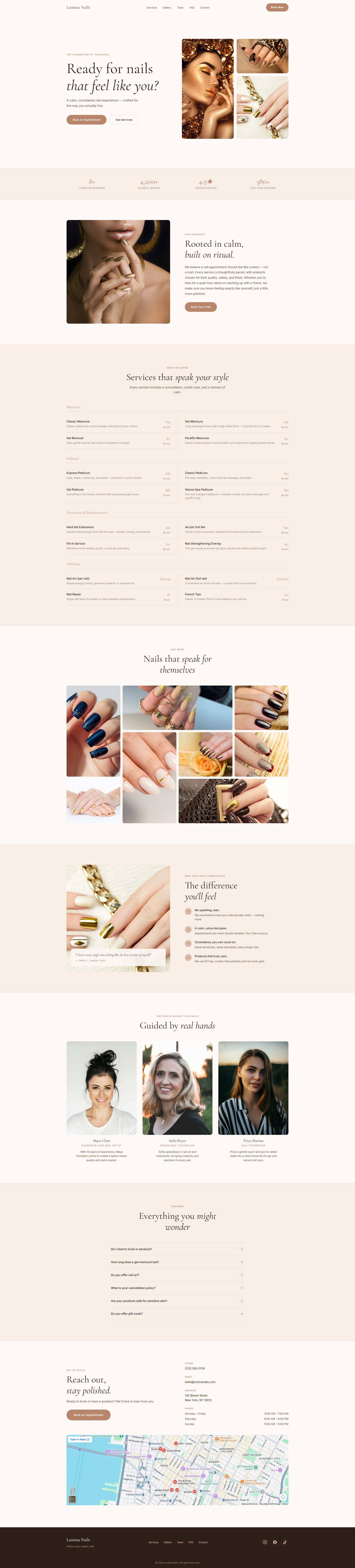

If you want something that does not match the default demo or Design 01, we can create a completely custom salon direction around your brand, target clients, and booking flow.
Good fit for
Offer Options
These options follow the same offer tiers. The salon details are adjusted around service menus, galleries, staff, and client requests.
Option 1
For businesses that only need complete booking inquiries first
One page for services, rates, contact details, and request details.
Option 2
For teams that need to approve, decline, and track incoming requests
Customers send requests online. Staff reviews them from one staff page.
Option 3
For businesses that need a clearer way to manage bookings, customers, staff, and daily schedules
One staff screen for the booking details your team keeps checking.
Option 4
For businesses that need staff work, customer records, billing, reports, and daily operations in one place
A fuller internal system for work that no longer fits in chat or spreadsheets.
Option 5
For branches, outside tools, customer accounts, or special reports
Quoted after a short review because branches, users, and outside tools change the build.
Pricing and Payment
Salon scope depends on services, sections, booking steps, and whether you want a staff page. Current prices and payment terms stay on the pricing page.
FAQ
No. This structure also works well for beauty studios and similar appointment-based self-care services.
Yes. We can structure the form around your services so clients can choose treatments and note preferences.
Not necessarily. You can start with a booking page first, then add a staff page later.
Tell us about your services and we’ll suggest the right website for your salon.
Ask About a Booking Setup
Ready to discuss a booking page or booking system? Send a short message about your business and we’ll point you to the right starting point.